Termux-WiFi-map 3.0
A script that comprehensively collects data on nearby Access Points (Wi-Fi) along with the location of their scanning, saves it, and allows exporting the collected data to JSON, CSV, or KML (support for points on a map).
language: Bash
release date: 2025-09-01
wifi,termux,map,kml,earth,trip,access point,hacking,osint,database,scan,tool,command,aio
last update: 2026-07-24
I used to not know how to make release tags on Github, so I kept all versions in the OLD directory of the repository.
From now on, each subsequent version will get its own release.
about
The script has advanced error handling during operation, so any missing functionality/errors in Termux:API (termux-location) do not interrupt the script.
Additionally, the script is characterized by high readability and ease of use.
instalation
# Clone repository
git clone https://github.com/BuriXon-code/Termux-WiFi-map
# Enter durectory and change permissions
cd Termux-WiFi-map
chmod +x termux-wifi-map
# Move executable to $PATH
cp termux-wifi-map "$PREFIX/bin"
operating modes
# Usage structure:
termux-wifi-map [mode] [options]
				R|-R|--run		[options]
				S|-S|--save		[options]
				C|-C|--cache	[options]
				F|-F|--files	[options]
				A|-A|--alias	[options]
				D|-D|--debug
				N|-N|--nobanner
				-v|--version
				-i|--version-info
				-u|--check-update
				-r|--report
				-b|--banner
				-h|--help
				[aliasname]
The first parameter D enables debug mode, in which every script operation is displayed along with a verbal message about its progress. Disabled by default. Useful for troubleshooting non-standard script execution errors.
interactive mode
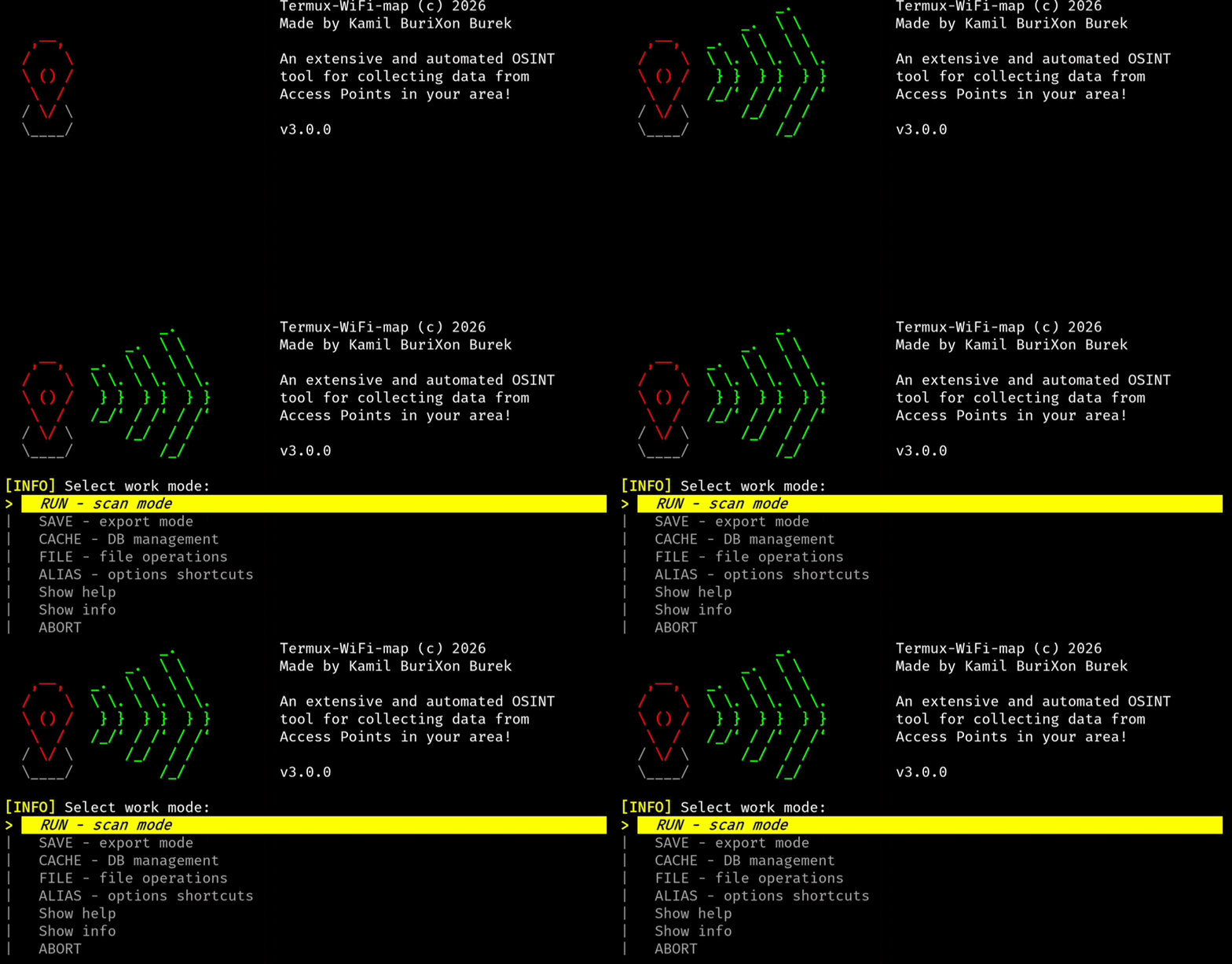
This option eliminates the need to remember and type very long CLI commands for quick, one-time actions.
scan mode -R
You can use the following parameters:
| option | description |
|---|---|
| -p | --provider [option] | choose location provider [gps|network|passive] (default: gps); gps is more accurate but slower and less reliable, network is faster but less precise |
| -d | --delay [value] | set delay between scans in continuous mode [0-3600s] (default 10s); actual delay may vary by 1–3 seconds depending on conditions |
| -c | --countinuous | enable continuous scanning mode until manually stopped |
| -q | --quiet | minimal output mode; vibrations and scan data printing disabled |
| -v | --haptic-engine [option] | choose vibration engine [termux|bell] (default: termux); termux is reliable but slow, bell may act as sound on some systems |
| -l | --last-location | choose whether to scan networks using the saved location when GPS is unavailable (e. g. in buildings) |
| -t | --timeout [value] | set the timeout for location retrieval [1-3600s] (default: 10s) |
| -a | --alt-buffer | enable an alternative terminal buffer for scanning (default: false) |
| -o | --output [file] | append additional output to another file (default: /dev/null) |
| -e | --exit-on-fail | stop script on first termux-api error; useful when GPS/Wi-Fi signal is unstable |
The scan will still go to the main APs database.
To change this format, use the F --convert option (file operations section).
save mode -S
You can use the following parameters:
| option | description |
|---|---|
| -n | --name [name] | output file name without extension; extension is added automatically |
| -f | --format [option] | output format: json, pjson, jsonl, csv, kml |
| -o | --override | allow overwriting the output file |
| -k | --kml-name [name] | set custom KML document name displayed in KML applications |
| format | description |
|---|---|
| JSON | classic JSON format |
| PJSON | pretty formatted JSON |
| JSONL | newline-delimited JSON |
| CSV | comma-separated values |
| KML | XML format for mapping points and routes |
| icon | meaning |
|---|---|
 |
open network |
 |
locked network [WPA/PSK] |
 |
cached location/Termux:API error |
cache mode -C
You can use the following parameters:
| option | description |
|---|---|
| -c | --count | display the number of data records |
| -l | --list | display all collected data (formatted list of known APs) |
| -j | --json | display collected data as Pretty JSON |
| -s | --search [patterns] | search for matching patterns in the database; patterns separated by commas, e.g. "Wi-Fi,AP" |
| -v | --vendor [name] | search for given vendor name, e.g. "Xiaomi" (case insensitive) |
| -p | --purge | clear the entire database (cannot be undone) |
file operations -F
You can use the following parameters:
| option | description |
|---|---|
| -c | --convert [file.jsonl] | convert JSONL to KML |
| -m | --merge [file1.kml] [file2.kml] | combine two KML files info one |
| -v | --valid [file] | validate a file structure (only from this script) |
| format | description |
|---|---|
| JSON | check structure and readability |
| PJSON | check structure and readability |
| JSONL | check structure and readability |
| CSV | check record count and parameter count |
| KML | check tag count, data correctness, and placemark icons |
However, this validation should not be trusted 100%.
alias mode -A
You can use the following parameters:
| option | description |
|---|---|
| -a | --add [name] [options] | add a new alias with the given name and parameters |
| -l | --list [name] | list all saved aliases or only those containing the given pattern in the name along with their content/function |
| -e | --edit [name] | edit the selected alias in the default text editor |
| -d | --delete [name] | delete the selected alias |
| -r | --run [name] | run the selected existing alias |
| -b | --bin [name] | create a new symlink for the script in $PATH |
| -u | --unbin [name] | remove the created script symlink from $PATH |
The symlink creation option creates actual items on the disk.
other options
| option | description |
|---|---|
| D | -D | --debug | displays precise information about the execution of each command |
| N | -N | --nobanner | disables the banner display at startup |
| -h | --help | display information about usage and tool options |
| -v | --version | display the tool name and version number |
| -i | --version-info | display detailed information, metadata, and legal info about the tool |
| [aliasname] | run created alias (if exists) (same as -A --run) |
usage examples
- Scan once and exit
termux-wifi-map -Rtermux-wifi-map --run - Continous scan with 5s delay
termux-wifi-map -R -c -d 5termux-wifi-map --run --continous --delay 5 - Continous scan with append to the "file.jsonl" file
termux-wifi-map -R -c -o file.jsonltermux-wifi-map --run --continous --output file.jsonl - Save DB to the "file.json" file
termux-wifi-map -S -n file -f jsontermux-wifi-map --save --name file --format json - Override an existing "file.json" file
termux-wifi-map -S -n file -f json -otermux-wifi-map --save --name file --format json --override - List all cached APs
termux-wifi-map -C -ltermux-wifi-map --cache --list - Search for "WiFi" and "AP" phrases
termux-wifi-map -C -s WiFi,APtermux-wifi-map --cache --search WiFi,AP - Search for "Xiaomi" BSSIDs
termux-wifi-map -C -v Xiaomi
# or
termux-wifi-map -C -v xiaomi
termux-wifi-map --cache --vendor Xiaomi # or termux-wifi-map --cache --vendor xiaomi - Check "file.json" integrity
termux-wifi-map -F -v file.jsontermux-wifi-map --file --valid file.json - Merge "file1.kml" with "file2.kml"
termux-wifi-map -F -m file1.kml file2.kmltermux-wifi-map --file --merge file1.kml file2.kml - Convert "file.jsonl" to "file.kml"
termux-wifi-map -F -c file.jsonltermux-wifi-map --file --convert file.jsonl - Create new loop-scan alias "run"
termux-wifi-map -A -a run R -ctermux-wifi-map --alias --add --run --continous - Run alias "run"
termux-wifi-map runtermux-wifi-map -A runtermux-wifi-map --alias run - Run alias "run"
termux-wifi-map -A runtermux-wifi-map --alias run - Show help/info/version
termux-wifi-map -htermux-wifi-map -itermux-wifi-map -v - Check for updates
termux-wifi-map -u
compatibility
It requires the installation of a small number of dependent packages (jq, termux-api, Termux:API on Android, awk).
The tool requires the termux-api package (installed via pkg/apt) and the Termux:API application (on Android).
The script works with Termux:API version 0.53.0 or higher.
changelog
[1.0] - Initial release
This is the very first official release of Termux-WiFi-map.
It marks the initial version of the tool, providing basic WiFi scanning, data saving, and validation features.
Future updates will expand functionality and improve usability.
[2.0] - Major functionality update
This is the second release of the script which, due to the number of introduced changes, received a separate major release.
This version introduces many improvements, fixes errors and imperfections detected in the previous version and adds a range of new options and functionalities.
The most important implementations in this version include:
- Fixing errors during data parsing by jq - in some Termux and termux-api installations the termux-api command incorrectly intercepted standard streams which caused corrupted JSON to be sent to jq;
- Ability to choose a haptic engine - the user can select the vibration engine (termux-api or system bell) through appropriate CLI parameters;
- Ability to list saved Access Points in raw JSON form - the previous formatted output generated for a very long time for large AP databases;
- Ability to search the collected database - the user can search for specific phrases or strings in the database;
- Ability to export specific searches - the user can export to one of the available formats those APs that were previously found.
[2.1] - Functionality update
This update adds an option to use the previously known location if a location update fails. Useful, among others, when scanning in buildings.
[2.2] - Functionality update
This version introduces many improvements and simplifications for the user. The most important ones include:
- An option to interactively select the operating mode without the need to enter long CLI parameters;
- An option to create dynamic aliases/shortcuts for options, allowing you to avoid typing long CLI parameters;
- The ability to set a custom timeout for location retrieval from termux-api (useful when GPS signal is unstable);
- Added debugging options (first parameter: D).
[2.3] - Fixed one minor bug:
- Slight line shifting during interactive export to KML.
[2.4] - Fixed two reported bugs:
- Problem parsing args wifi -A [aliasname] for non-existent aliasname.
- -v | --version option started an infinite loop.
- Additionally: Checking if the alias aliasname is readable.
[2.5] - Added 'nobanner' option:
- An option has been added to disable the banner display on startup.
[2.6] - Fix banner:
- Removed the delay between banner animation frames. The banner now renders faster.
[2.6.1] - Fix URL open:
- Minor change for opening project page.
[2.7] - Fix KML exporting:
- Fixed a user-noted bug where ANSI cleanup sequences were being written to the file during resize during export. A file descriptor change was necessary.
[3.0] - A huge dose of improvements:
This update adds many new features, improvements, fixes minor bugs, etc. The most important changes include:- Added option to merge KML files.
- Added option to search AP by vendor name.
- Added option to list scans on an alternative terminal.
- Added option to append currently collected data to the file (along cache file).
- Added option to check for script updates.
- Minimized the returned exit code (0 or 1).
- Removed old animated progress bar when saving KML.
- Many bugs have been fixed.
[3.0.1] - Minor update:
- The curl command checking for updates could terminate the script with a non-zero return code when the set -e flag was set.
[3.0.1] - Anither minor update:
- typo
license
Any derivative works must also be released under GPL v3.0.