MockGPS
A lightweight Android mock-location application with a graphical map interface and an optional Termux command-line companion for controlling mock GPS locations.
language: Kotlin
release date: 2026-09-13
mockgps,gps,android,location,mock location,termux,cli,automation,map,android tool
last update: 2026-10-18
latest version: v0.2.1
 0
0
 0
0
MockGPS consists of two related packages: the Android application and the termux-mockgps command-line companion.
about
The application provides a graphical interface with an interactive map, while the actual location injection is handled by an Android foreground service.
A separate command-line companion, termux-mockgps, allows the application to be controlled directly from Termux. This makes MockGPS useful not only interactively, but also from shell scripts and automation workflows.
The two components communicate through Android's native broadcast and service mechanisms. The Termux script does not implement the mock-location functionality itself - it sends commands to the Android application, which performs the actual location injection.
components
The project is divided into two packages:
MockGPS works independently and does not require Termux.
The termux-mockgps package is optional and is intended primarily for command-line users, automation and shell scripts.
| component | purpose |
|---|---|
| MockGPS | Android application providing the graphical interface and mock-location service |
| termux-mockgps | POSIX shell command-line utility for controlling MockGPS from Termux |
MockGPS works independently and does not require Termux.
The termux-mockgps package is optional and is intended primarily for command-line users, automation and shell scripts.
how it works
MockGPS is built around one simple rule: the graphical interface and external tools only decide what location should be simulated, while the foreground service is responsible for continuously providing that location to Android.
The important parts of the application are connected like this:
The same flow works whether the command comes from the app itself, from Termux or from another Android application. The external command does not inject the location directly. It reaches MockGpsReceiver, which updates the application's state and starts, stops or updates MockLocationService as required.
This separation is intentional. The receiver is the control layer, the service is the location-injection layer, and the UI is only one possible frontend.
The important parts of the application are connected like this:
                    USER / AUTOMATION
                           |
             +-------------+-------------+
             |                           |
             v                           v
     MockGPS Android UI          termux-mockgps / ADB
             |                           |
             |                    Android broadcast
             |                           |
             +-------------v-------------+
                           |
                    MockGpsReceiver
                           |
              +------------+------------+
              |            |            |
             set          on/off       drift
              |            |            |
              +------------v------------+
                           |
                      saved state
                           |
                           v
                 MockLocationService
                           |
                  foreground service
                           |
               +-----------+-----------+
               |                       |
               v                       v
        test provider gps       test provider network
               |                       |
               +-----------+-----------+
                           |
                           v
                    Android Location API
                           |
                           v
                 applications requesting
                    device location
The same flow works whether the command comes from the app itself, from Termux or from another Android application. The external command does not inject the location directly. It reaches MockGpsReceiver, which updates the application's state and starts, stops or updates MockLocationService as required.
This separation is intentional. The receiver is the control layer, the service is the location-injection layer, and the UI is only one possible frontend.
application architecture
The Android application is composed of a small number of responsibilities rather than putting the complete mocking logic inside the activity.
Because the service is independent from the activity lifecycle, closing the graphical interface does not by itself mean that mocking has stopped. The service continues to run until it is stopped or Android/device restrictions terminate it.
| component | responsibility | when it is used |
|---|---|---|
| MainActivity | Graphical interface, map, coordinate selection and application settings | When the user opens MockGPS |
| MockGpsReceiver | Receives external broadcast commands and translates them into application actions | Termux, ADB, automation and other apps |
| MockLocationService | Runs the actual mock-location provider updates | While mocking is active |
| BootReceiver | Handles the Android boot event and restores operation when configured | After device reboot |
| State | Stores persistent settings and the last selected location | Across activity/service restarts and reboots |
Because the service is independent from the activity lifecycle, closing the graphical interface does not by itself mean that mocking has stopped. The service continues to run until it is stopped or Android/device restrictions terminate it.
application features
MockGPS provides:
A selected mock position and a real device position are treated as two different concepts. The selected position is the location that MockGPS is asked to inject; the real position is only used by the interface for orientation and comparison when Android provides it.
- interactive map for selecting the mock location;
- manual latitude and longitude control;
- Android gps and network mock providers;
- foreground service for continuous mock-location operation;
- optional location drift;
- optional automatic startup after device boot;
- external broadcast control;
- optional toast notifications;
- display of the device's real location as a separate map indicator when available.
A selected mock position and a real device position are treated as two different concepts. The selected position is the location that MockGPS is asked to inject; the real position is only used by the interface for orientation and comparison when Android provides it.
interface
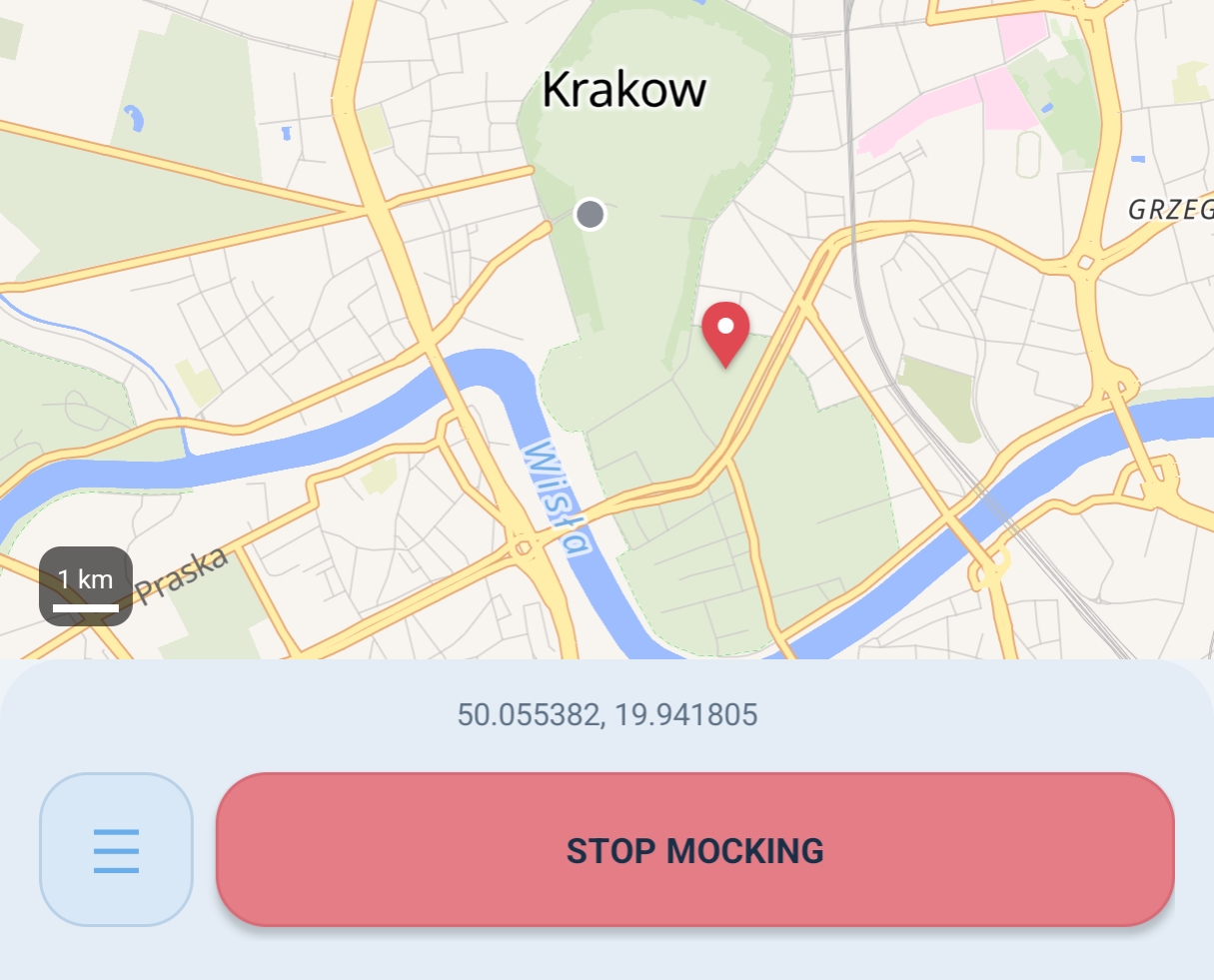
The selected mock location is displayed independently from the device's real location. When Android provides a real location, MockGPS can display it as a small gray marker, making it possible to visually compare the real and mocked positions.
The map is based on MapLibre and uses the OpenFreeMap Liberty style.
mock location service
The actual mock location is provided by MockLocationService.
The service runs as an Android foreground service while mocking is active. It supplies the configured location through Android test providers:
Using a foreground service allows the mock-location operation to remain active while the application is not in the foreground, subject to Android and device-manufacturer background restrictions.
The service updates the providers with the current configured coordinates. When drift is enabled, the effective coordinates can change over time even though the stored base location remains the selected point.
The foreground notification is deliberately kept quiet and low importance. Its purpose is to make the active service visible to Android and the user while also exposing the currently mocked coordinates.
The service runs as an Android foreground service while mocking is active. It supplies the configured location through Android test providers:
| provider | purpose |
|---|---|
| gps | GPS mock provider |
| network | network location mock provider |
Using a foreground service allows the mock-location operation to remain active while the application is not in the foreground, subject to Android and device-manufacturer background restrictions.
The service updates the providers with the current configured coordinates. When drift is enabled, the effective coordinates can change over time even though the stored base location remains the selected point.
The foreground notification is deliberately kept quiet and low importance. Its purpose is to make the active service visible to Android and the user while also exposing the currently mocked coordinates.
location drift
MockGPS includes an optional drift mode.
When enabled, the mocked position can move instead of remaining completely static. This can be enabled or disabled from the application or through the Termux companion.
The movement behaviour is handled by the Android application.
When enabled, the mocked position can move instead of remaining completely static. This can be enabled or disabled from the application or through the Termux companion.
termux-mockgps drift on
termux-mockgps drift off
termux companion
termux-mockgps is a small POSIX shell utility designed to control MockGPS without opening the graphical application.
It uses Android's built-in am and pm commands and does not require additional Termux packages.
Available commands:
It uses Android's built-in am and pm commands and does not require additional Termux packages.
Available commands:
termux-mockgps start [LAT LON]
termux-mockgps set [LAT LON]
termux-mockgps boot <0|1|on|off>
termux-mockgps drift <0|1|on|off>
termux-mockgps open
termux-mockgps stop
termux-mockgps help
termux-mockgps version
termux commands
start
Starts mock-location operation:termux-mockgps start 50.06143 19.93658
set
Changes the configured mock location:termux-mockgps set 50.06143 19.93658stop
Stops mock-location operation:termux-mockgps stop
open
Opens the MockGPS application:termux-mockgps open
boot
Controls automatic startup after reboot:termux-mockgps boot on
termux-mockgps boot off
drift
Enables or disables location drift:termux-mockgps drift on
termux-mockgps drift off
help and version
termux-mockgps help
termux-mockgps version
coordinate formats
Coordinates can be supplied in several forms.
Standard:
Comma-separated:
Explicit latitude/longitude:
Valid ranges:
Standard:
termux-mockgps set 50.06143 19.93658
termux-mockgps set 50.06143,19.93658
termux-mockgps set -lat:50.06143 -lon:19.93658
| coordinate | range |
|---|---|
| latitude | -90 ... +90 |
| longitude | -180 ... +180 |
toast notifications
The Termux companion normally allows MockGPS to display short Android toast notifications when commands change the application state.
Notifications can be disabled with:
The direct broadcast API uses toast=no for the same purpose.
Notifications can be disabled with:
termux-mockgps -notoast set 50.06143 19.93658
boot restoration flow
When Start on boot is enabled, MockGPS stores that preference. After Android sends the boot-completed event, the boot receiver checks the saved state and attempts to restore mocking.
Boot restoration is an application preference, not a guarantee that every Android manufacturer will allow unrestricted background execution. Battery-management and autostart policies can still affect the result.
Android boots
     |
     v
BootReceiver receives BOOT_COMPLETED
     |
     v
Read persistent MockGPS state
     |
     +---- start on boot disabled ----> do nothing
     |
     v
Mocking enabled / location available
     |
     v
Start MockLocationService
     |
     v
Foreground mock-location operation resumes
Boot restoration is an application preference, not a guarantee that every Android manufacturer will allow unrestricted background execution. Battery-management and autostart policies can still affect the result.
broadcast api
The exported receiver is:
The main command extra is command. Supported commands are set, on, off and drift.
The receiver can also handle the boot-control extra independently. This makes the external interface useful not only for changing the location but also for changing long-lived application behaviour.
Set location:
Start mocking:
Stop mocking:
Enable drift:
Boot control:
dev.burixon.mockgps/.MockGpsReceiver
The receiver can also handle the boot-control extra independently. This makes the external interface useful not only for changing the location but also for changing long-lived application behaviour.
| extra | value | meaning |
|---|---|---|
| command | set / on / off / drift | Main external command |
| lat | decimal latitude | Latitude for set |
| lon | decimal longitude | Longitude for set |
| drifting | enable / disable and accepted aliases | Controls drift mode |
| boot | enable / disable and accepted aliases | Controls start-after-boot preference |
| toast | anything except no | Allows command-related toast feedback |
Set location:
adb shell am broadcast \
  -n dev.burixon.mockgps/.MockGpsReceiver \
  --es command set \
  --es lat 50.06143 \
  --es lon 19.93658
adb shell am startservice \
  -n dev.burixon.mockgps/.MockLocationService \
  --es command on
adb shell am stopservice \
  -n dev.burixon.mockgps/.MockLocationService
adb shell am broadcast \
  -n dev.burixon.mockgps/.MockGpsReceiver \
  --es command off
adb shell am broadcast \
  -n dev.burixon.mockgps/.MockGpsReceiver \
  --es command drift \
  --es drifting enable
adb shell am broadcast \
  -n dev.burixon.mockgps/.MockGpsReceiver \
  --es boot enable
state and persistence
MockGPS keeps the important operating state persistent instead of making the activity the single source of truth. The following values are stored:
This is important for external control: a script can change the selected coordinates without needing to keep the activity open, and the service can use the stored coordinates when it is started again.
| stored value | purpose |
|---|---|
| latitude / longitude | Last selected mock location |
| mocking enabled | Whether the service should remain logically enabled |
| start on boot | Whether boot restoration should be attempted |
| drift enabled | Whether simulated movement is enabled |
| broadcast commands | Whether external receiver commands are accepted |
| last real location | Last real position used by the map UI |
This is important for external control: a script can change the selected coordinates without needing to keep the activity open, and the service can use the stored coordinates when it is started again.
start, update and stop flow
A normal mocking session consists of three logical phases.
1. Select a location
The user taps the map or an external command supplies lat and lon. MockGPS stores these coordinates as the current mock location.
2. Start the service
When mocking is enabled, MockLocationService becomes the active foreground service and begins supplying the configured coordinates through the test providers.
3. Change or stop
Changing the coordinates updates the stored state and, when mocking is active, the running service can immediately use the new position. Stopping disables the active mocking operation and stops the foreground service.
The important distinction is that set changes where MockGPS should mock, while on and off control whether the mock-location service is active.
1. Select a location
The user taps the map or an external command supplies lat and lon. MockGPS stores these coordinates as the current mock location.
2. Start the service
When mocking is enabled, MockLocationService becomes the active foreground service and begins supplying the configured coordinates through the test providers.
3. Change or stop
Changing the coordinates updates the stored state and, when mocking is active, the running service can immediately use the new position. Stopping disables the active mocking operation and stops the foreground service.
The important distinction is that set changes where MockGPS should mock, while on and off control whether the mock-location service is active.
installation
MockGPS
Install the APK normally on Android.After installation, open Android Developer Options and select MockGPS as the device's mock-location application. The exact wording and location of this setting may differ between Android versions and manufacturers.
termux-mockgps
Copy the script into a directory in the Termux $PATH:cp termux-mockgps $PREFIX/bin/
chmod +x $PREFIX/bin/termux-mockgps
building from source
MockGPS is a standard Gradle Android project and includes the Gradle Wrapper. A development build can therefore be created without installing Gradle globally.
The resulting debug APK is generated at:
Android Studio can also open the project directly and use the same Gradle configuration.
git clone https://github.com/BuriXon-code/MockGPS.git
cd MockGPS
./gradlew assembleDebug
app/build/outputs/apk/debug/app-debug.apk
compatibility
MockGPS currently targets Android 36 while maintaining a minimum supported Android version of 10 (API 29).
Project configuration:
The Termux companion is POSIX shell and is intended for Termux environments providing Android's am and pm commands. It does not contain a second location-mocking implementation; it is a lightweight frontend over MockGPS's Android control interface.
Project configuration:
| parameter | value |
|---|---|
| application ID | dev.burixon.mockgps |
| minimum SDK | 29 |
| target SDK | 36 |
| compile SDK | 36 |
| Java | 17 |
| MapLibre Android SDK | 13.6.1 |
The Termux companion is POSIX shell and is intended for Termux environments providing Android's am and pm commands. It does not contain a second location-mocking implementation; it is a lightweight frontend over MockGPS's Android control interface.
permissions and android configuration
MockGPS uses the Android permissions required for location and foreground-service operation, including:
- fine location;
- coarse location;
- foreground service;
- foreground service with location type;
- notifications;
- receive boot completed.
troubleshooting
Mock location does not work
Check that:- MockGPS is selected as the mock-location application;
- Android location services are enabled;
- MockGPS has the required permissions;
- the foreground service is running;
- battery optimization or manufacturer-specific background restrictions are not stopping the application.
The map does not appear
The map style and map data require network access. Check the device's Internet connection.Mocking stops in the background
Check Android battery optimization and manufacturer-specific background restrictions for MockGPS.termux-mockgps cannot find MockGPS
Verify that the application package is installed:/sysyem/bin/pm path dev.burixon.mockgps
changelog
[0.1.0] - Initial release
First public release of MockGPS.
- Android mock-location application with a graphical map interface.
- MapLibre-based map using the OpenFreeMap Liberty style.
- Custom mock location selection and coordinate input.
- GPS and network mock providers.
- Foreground mock-location service.
- Optional location drift.
- Optional startup after device boot.
- External broadcast API.
- Optional toast notifications.
- Real-location visualization on the map.
- Initial termux-mockgps command-line companion.
[0.2.0] - Improved UI
- added persistent map camera position, zoom, bearing and tilt
- added a button to center the map on the selected mock location
- added dynamic mock location button color matching the mock marker
- added a button to copy mock coordinates to the clipboard
- removed the space after the comma from displayed coordinates
license
MockGPS is released under the GPL-3.0 license.
See the LICENSE file in the GitHub repository for the complete licensing terms.
See the LICENSE file in the GitHub repository for the complete licensing terms.